DevChestra is a local workflow builder for headless coding agents. Draw the process once, or have your agent write it, and Claude Code, Codex, OpenCode or Pi run it the same way every time.
DevChestra drives the coding-agent CLIs you're already signed in to. It never asks for their keys; it uses what's there. Pick the CLI and model per step, and mix them in one workflow.
Decision nodes are the one exception: they call a model directly, so they need their own provider key.
Agentreview_diff
Chat is vibes. A workflow isn't.
Same prompt, different tools, different order, different day. In DevChestra you decide once: who runs, what they may touch, what they hand back, and what happens next. The agent still improvises inside its step. The orchestration around it doesn't.
Agents automatically receive what came before them, so a plain prompt like “sort by total stars, descending” just works.
cliWho runs
claude-code
promptWhat to do
Review the diff for risky changes.
permissionsWhat it may touch
network: false · write: workspace
outputWhat it hands back
{ "findings": [ … ] }
limitsHow long it gets
timeoutMin: 20 · validationRetries: 2
nextWhat happens next
→ verify
Gate2 branches
Draw it, or let your agent write it.
Either way you get the same file: .devchestra/workflows/<id>.json.
canvascli
canvas
On the canvas
See the whole process. Runs, transcripts and replay live in the same window.
The CLI speaks JSON. Your agent can create a workflow, start a run and watch it, and bring approvals back to you.
$ devchestra start --headless
$ devchestra skill # the guide your agent reads$ devchestra workflow create \
--project . --file lint-then-ask.json
$ devchestra run start lint-then-ask --project .
$ devchestra run watch <run-id> --jsonl
# exit 5: paused, awaiting approval
Joinmode: first
Either branch, one workflow file.
Add a node10 types
Ten nodes. That's the whole vocabulary.
AgentRun an agent step. Pick the CLI and model, write the prompt.
ShellRun a command: tests, linters, whatever you'd run yourself.
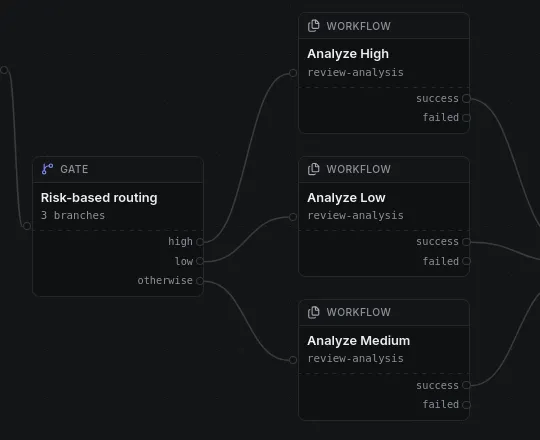
GateRoute by condition. First matching branch wins.
JoinMerge branches. Wait for the first one, or all of them.
ApprovalPause for a person. Nothing moves until someone says go.
DecisionAsk a decision model for a judgment call.
LoopRepeat until a condition is met, keeping each round.
For eachProcess every item in a list, one at a time.
Run workflowCall a reusable workflow and wait for it.
EndFinish the run.
Approvalwait: you
Local, and yours.
No cloud account.
No queue, no sandbox magic. It runs on your machine.
Your permissions.
Steps run as you, in the project folder, an existing worktree, or a fresh worktree per run.
Lives in your repo.
Workflows are JSON in .devchestra/workflows/. Commit them, review them, share them with the team.
No silent overwrites.
If two people edit the same workflow, DevChestra catches the conflict.
Every agent step gets only what you give it.
networkfalse
Allow or deny the CLI’s web and network tools.
write["workspace"]
Read-only, or write files in the run’s workspace.
shellfalse
Turn the CLI’s built-in shell tool on or off.
mcpServers["github"]
Pick from the MCP servers you’ve already set up for that CLI.
These are tool-level limits on agent steps, not an OS sandbox. Shell nodes run as ordinary processes, with your permissions.
messageReady to install DevChestra?
A simulated approval. Nothing moves until someone says go.
Endends as success
Install DevChestra.
You need Node 22 or newer and pnpm 10.14.0. setup:global installs everything, links the devchestra command, and opens the editor in your browser. It's safe to run again.
$ git clone https://github.com/Pranav-Official/Dev-Chestra.git$ cd Dev-Chestra$ pnpm setup:global$ devchestra start
Working through an agent? Run devchestra start --headless, then devchestra skill. It prints the guide your agent reads to create, validate, run and watch workflows.